Free VPN for Chrome
Browse privately with a free VPN for Chrome. Install a VPN extension, connect to a server, and protect the traffic inside your browser without installing a full VPN application on your computer.
- Free to use
- Easy one-click connection
- Hide your IP address
- Encrypt browser traffic
- No complicated setup
- Works with Chromium-based browsers
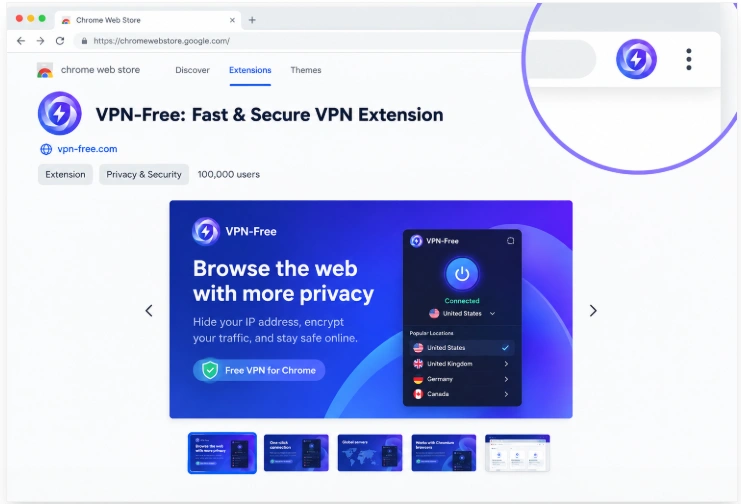
Free VPN Extension for Chrome
A Chrome VPN extension is a convenient option when you only want to protect your web browsing.
Instead of routing every application on your computer through a VPN, a browser extension works directly inside Chrome. This makes it useful for browsing websites, checking email, using web apps, and accessing online services while keeping your regular desktop applications connected through your normal internet connection.
A browser VPN extension can also be useful when you are using a shared or public computer where installing a complete VPN application is inconvenient.
Why Use a VPN on Chrome?
Chrome is used for a large part of everyday internet activity, from searching and shopping to banking, streaming, social media, and working online.
A VPN can add another layer of privacy to your browser connection by encrypting traffic between your browser and the VPN service and replacing your visible IP address with the VPN server's address.
Browse With More Privacy
Websites can normally see the public IP address associated with your internet connection. When you connect through a VPN server, websites instead see the server's IP address.
Secure Browser Traffic
A VPN can help protect your connection when browsing on networks you do not fully trust, including public Wi-Fi in cafés, hotels, airports, and other shared locations.
Change Your Virtual Location
Connecting to a VPN server in another location can make your browser appear to be connecting from that server's region.
Keep in mind that a VPN does not guarantee access to every website or online service. Some websites actively detect and restrict VPN connections.
Simple Browser Protection
A Chrome extension can be easier to use than a complete VPN application. Once installed, you can open the extension, choose a server, and connect without changing your computer's network settings.
How Does a Chrome VPN Work?
A VPN Chrome extension works as a browser-level connection.
When the extension is connected, supported browser traffic is routed through the VPN service. Your connection is encrypted between your browser and the VPN server, while websites see the VPN server’s IP address instead of your normal public IP.
The process is straightforward:
Chrome browser → VPN extension → VPN server → Website
When you disconnect, Chrome returns to its normal network connection.
This browser-level approach is different from a desktop VPN application, which can protect traffic from multiple applications across the entire device.
How to Install a Free VPN on Chrome
Installing a VPN extension normally takes only a few minutes.
Step 1: Choose a VPN Extension
Choose a VPN service that provides a Chrome-compatible browser extension.
Check the provider's privacy policy, supported browsers, available locations, and free-plan limitations before installing it.
Step 2: Add the Extension to Chrome
Open the Chrome Web Store and search for the VPN extension.
Select the extension provided by the VPN service and click Add to Chrome.
Review the permissions requested by the extension before completing the installation.
Step 3: Sign In or Create an Account
Open the newly installed extension from Chrome's extensions menu.
Depending on the VPN service, you may need to create a free account or sign in before connecting.
Step 4: Connect to a VPN Server
Open the extension and choose a server location.
Use the Quick Connect option if you simply want the service to select an available server automatically.
Once connected, your browser traffic covered by the extension will use the VPN connection.
Step 5: Check Your IP Address
After connecting, you can use an IP address checking website to confirm that your public IP address has changed.
If the location still appears unchanged, disconnect and reconnect to another available server.
Does a Chrome VPN Protect the Whole Computer?
No.
A browser VPN extension is designed to protect traffic handled by the browser. Other applications on your computer can continue using your normal internet connection.
For example, if Chrome is connected to a VPN while a separate desktop application is running, that application may continue to use your regular ISP connection.
If you want to protect traffic from your entire computer, use a full VPN application for your operating system instead.
Chrome VPN vs Full VPN App
| Feature | Chrome VPN Extension | Full VPN App |
|---|---|---|
| Protects Chrome traffic | Yes | Yes |
| Protects other desktop apps | No | Yes |
| Easy to install | Yes | Yes |
| Works directly in Chrome | Yes | No |
| Changes browser IP | Yes | Yes |
| Device-wide protection | No | Yes |
| Useful for browser-only privacy | Yes | Yes |
The right option depends on what you want to protect.
If you only need private browsing in Chrome, an extension can be sufficient. If you want your entire device to use the VPN connection, install the VPN application for Windows, macOS, or another supported platform.
VPN for Chrome on Other Browsers
Chrome is based on Chromium, so compatible extensions can also work with several other Chromium-based browsers.
Depending on the extension and browser, supported browsers may include:
- Google Chrome
- Microsoft Edge
- Brave
- Chromium
- Opera
- Vivaldi
Compatibility can vary, so check the VPN provider’s current browser support before installation. Proton VPN, for example, currently lists Chrome, Brave, Edge, Chromium, Opera, and Vivaldi among browsers that can use its Chrome-compatible extension.
Free VPN for Chrome Features
A useful free Chrome VPN should make the basic connection process simple.
One-Click Connection
Connect to an available VPN server directly from the browser extension.
IP Address Protection
When connected, websites generally see the VPN server’s public IP address rather than your normal public IP.
Encrypted Connection
A VPN extension can encrypt supported browser traffic between your browser and the VPN service.
Multiple Server Locations
Depending on the provider and free plan, you may be able to select from several VPN locations.
Lightweight Setup
A browser extension does not require you to install a complete VPN client when your main requirement is browser-level protection.
Is a Free VPN for Chrome Safe?
The security of a VPN extension depends heavily on the provider behind it.
Before installing a free VPN extension, check:
- Who operates the service
- What information it collects
- Whether connection or browsing logs are stored
- What permissions the extension requests
- Where the company is based
- Whether the extension is distributed through a trusted browser store
- Whether the provider explains how its free service is funded
A free VPN should not automatically be considered private simply because it is free.
Your VPN provider can potentially observe information about your connection, so choosing a provider with a clear privacy policy is important.
Can I Use a Free VPN on Chrome Without Installing an App?
Yes.
A Chrome-compatible VPN extension can work as a standalone browser extension. You do not necessarily need to install a full VPN application on your computer.
This makes an extension particularly convenient when your goal is to protect browser activity rather than all network traffic on the device. Proton VPN, for example, states that its Chrome extension is a standalone product and does not require its full VPN app.
Can a Chrome VPN Hide My IP Address?
Yes, when the VPN connection is active, websites normally see the IP address of the VPN server rather than your regular public IP address.
However, an IP address is only one part of online identification. Websites can also use cookies, account logins, browser characteristics, and other technologies.
A VPN therefore improves network privacy but does not make you completely anonymous online.
Can I Use a VPN on Chrome for Public Wi-Fi?
Yes.
A VPN can be useful when using public Wi-Fi because it encrypts supported browser traffic between your browser and the VPN service.
This can add protection when browsing from places such as:
- Hotels
- Airports
- Cafés
- Libraries
- Coworking spaces
- Universities
- Other shared Wi-Fi networks
You should still use HTTPS websites, keep Chrome updated, and avoid entering sensitive information into suspicious websites.
Why Is My Chrome VPN Not Working?
If the extension connects but websites still do not load correctly, try these steps.
Check Your Internet Connection
Disconnect the VPN and verify that your normal internet connection is working.
Reconnect to the VPN
Disconnect from the current server and connect again.
Try Another Server
A particular server may be temporarily overloaded or unavailable.
Restart Chrome
Close Chrome completely and reopen the browser before trying again.
Update the Extension
Make sure you are running the latest available version of the VPN extension.
Check Browser Permissions
Open Chrome's extension settings and review the VPN extension's permissions and status.
Test Without Other Extensions
Privacy blockers, proxy extensions, security tools, and other VPN extensions can sometimes interfere with each other.
Temporarily disable conflicting extensions and test the VPN again.
VPN Extension or Chrome Proxy?
A VPN extension and a manual proxy configuration are not exactly the same.
A Chrome VPN extension generally provides a simpler interface for connecting to the provider's VPN infrastructure, while a proxy usually requires separate server information and configuration.
For most users who want a simple browser-based connection, a dedicated VPN extension is easier to manage.
Free VPN for Chrome FAQ
Yes. Several VPN providers offer Chrome extensions with free plans. Availability, server locations, data limits, and features vary by provider.
Get a Free VPN for Chrome
A Chrome VPN extension is a convenient way to add VPN protection to your web browsing without configuring your entire computer.
Install a trusted extension, sign in, choose a server, and connect whenever you want to browse through a VPN.
Get Free VPN for ChromeFor complete device protection, see our VPN guides for Windows , macOS , Android , iPhone/iPad and Linux .